While some Google tools come and go (like the Google News Timeline and Labs), it's nice to know that Google remains committed to supporting Google Earth. And in that effort they have just announced a new assortment of high resolution satellite images. (see below)
If there is a location you are either waiting for updates for, or are anxious to see Street View arrive, there's a quick and easy way to find out. Follow Your World is a free tool (think Google Alerts for Google Earth) that allows you to request email updates when new imagery becomes available for a desired area.
And why would you want all of this geographic information on Google Earth? Because Google Earth is PERFECT for genealogy research! You can find ancestor homes, precisely plot homesteads, create historic map overlays that take you back in time, and even tell your family history story in Google Earth. The Family History Tours I developed for my Google Earth for Genealogy series will give you a way to capture the attention of even the most video-game-mad youngsters in your life!
Watch these quick videos to see for yourself what you can accomplish using Google Earth for genealogy, then click here for 30% off (or type www.google4genealogy.com in your browser) of the Google Earth for Genealogy tutorial video CDs now through 4/3/12:
Visit www.Google4genealogy.com for 30% off now through 4/3/12
Countries/regions receiving high resolution satellite updates:Canada, United States, Mexico, Cuba, Haiti, Dominican Republic, Belize, Guatemala, El Salvador, Honduras, Jamaica, Guadeloupe, Grenada, Trinidad and Tobago, Costa Rica, Panama, Brazil, Colombia, Venezuela, Guyana, Suriname, Ecuador, Peru, Bolivia, Peru, Chile, Argentina, Greenland, Morocco, Algeria, Tunisia, Libya, Egypt, Sudan, South Sudan, Chad, Niger, Mali, Mauritania, Senegal, Guinea, Liberia, Ghana, Benin, Nigeria, Cameroon, Central African Republic, Eritrea, Ethiopia, Somalia, Uganda, Kenya, Tanzania, Democratic Republic of the Congo, Congo, Angola, Zambia, Mozambique, Botswana, South Africa, Lesotho, Swaziland, Madagascar, United Kingdom, Ireland, Spain, Portugal, France, Italy, Germany, Austria, Italy, Denmark, Norway, Sweden, Finland, Latvia, Lithuania, Poland, Ukraine, Slovakia, Hungary, Romania, Moldova, Bulgaria, Serbia, Bosnia and Herzegovinia, Macedonia, Albania, Greece, Turkey, Russia, Cyprus, Georgia, Azerbaijan, Armenia, Syria, Iran, Iraq, Kuwait, Jordan, Lebanon, Israel, Saudi Arabia, Qatar, Yemen, Oman, United Arab Emirates, Kazakhstan, Uzbekistan, Turkmenistan, Tajikistan, Kyrgzstan, Afghanistan, Pakistan, India, Sri Lanka, Bangladesh, Myanmar, China, Nepal, Bhutan, Thailand, Laos, Vietnam, Taiwan, Mongolia, North Korea, South Korea, Japan, The Philippines, Indonesia, Australia, New Zealand, New Caledonia, Fiji, and Antarctica
These updates are now available in Google Earth and will be live in Google Maps in the coming days. For a full picture of the updated imagery, download this KML for viewing in Google Earth.
Showing posts with label google. Show all posts
Showing posts with label google. Show all posts
Friday, March 30, 2012


Wednesday, March 21, 2012
Google Earth Street View Story - Cool Video
Ya gotta love Google Earth's Street View! It can bring you up close and personal to locations important to your family history. For instance in our family there's the house in
England where Grandpa Cooke was born...

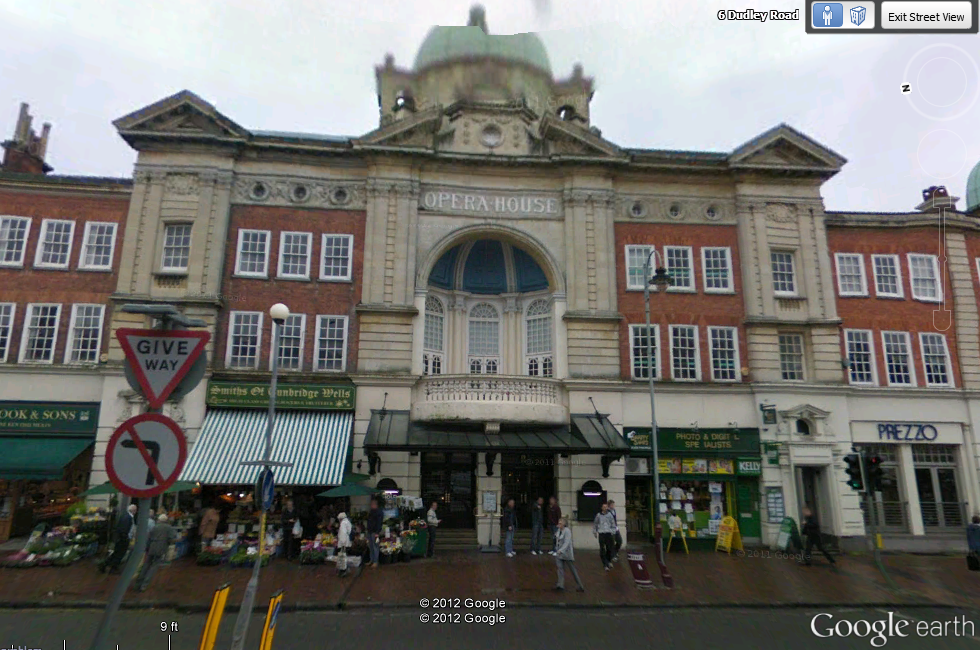
And the Opera House where he and his mother played in the orchestra in the early 20th century...

It's almost like being there! But what if you really could be there? There's a great little video that brings street view to life. It's called 2nd Avenue, and it's one of the finalist WNET's Favorite short videos contest. Check it out and cast your vote for Street View!
England where Grandpa Cooke was born...

And the Opera House where he and his mother played in the orchestra in the early 20th century...
It's almost like being there! But what if you really could be there? There's a great little video that brings street view to life. It's called 2nd Avenue, and it's one of the finalist WNET's Favorite short videos contest. Check it out and cast your vote for Street View!
Images like these are just the tip of the iceberg as to what Google Earth can do for your family history. Watch this short video to see more, and my Google Earth for Genealogy DVDs will show you step by step how to do it all.
Wednesday, November 9, 2011
Google's Plus Sign Now Has New Meaning
On October 27 I reported on this blog that Google quietly eliminated the use of the plus sign operator in Google Search. (A Change You Need to Know About)
 The technology community suspected that "the move was in response to their growing focus on Google+ and the possibility of a new use for the "plus" sign." I encouraged you to stay tuned.
You didn't have to wait long to find out why the change was made. Yesterday Google announced on the Official Google Blog a use for that plus sign: Direct Connect from Google Search.
Direct Connect from Google Search
It's no surprise that the plus sign's new role has something to do with connecting users to Google+, the (fairly) new social networking platform. The + sign is now all about quickly connecting you directly to business Google+ Pages.
Many have wondered why Google+ didn't allow for business and organization profiles since that is a big part of the Facebook offering. It appears now that the delay was in order to re-purpose the plus sign.
Google explained it this way: "Maybe you're watching a movie trailer, or you just heard that your favorite band is coming to town. In both cases you want to connect with them right now, and Direct Connect makes it easy - even automatic. Just go to Google and search for [+], followed by the page you're interested in (like +Angry Birds). We'll take you to their Google+ page, and if you want, we'll add them to your circles."
So the plus sign can now get us connected to Angry Birds, quicker? Whoo hoo?! Gosh, I was perfectly happy with the way the plus sign got me to web pages that shared information about my ancestor (+Jehu Burkhart I miss you!)
Direct Connect is up and running for a couple of the big boy brands like +Google, +Pepsi, and +Toyota, so you can try those searches to see how they work. Eventually the rest of the world will be allowed in and you can learn more about how Direct Connect for your organization in the Google Help Center.
So remember, if you want to connect with Pepsi you can plus. But, if you're looking for a specific ancestor, word, or phrase you need to surround them in quotation marks. And you can quote me on that!
The technology community suspected that "the move was in response to their growing focus on Google+ and the possibility of a new use for the "plus" sign." I encouraged you to stay tuned.You didn't have to wait long to find out why the change was made. Yesterday Google announced on the Official Google Blog a use for that plus sign: Direct Connect from Google Search.
Direct Connect from Google Search
It's no surprise that the plus sign's new role has something to do with connecting users to Google+, the (fairly) new social networking platform. The + sign is now all about quickly connecting you directly to business Google+ Pages.
Many have wondered why Google+ didn't allow for business and organization profiles since that is a big part of the Facebook offering. It appears now that the delay was in order to re-purpose the plus sign.
Google explained it this way: "Maybe you're watching a movie trailer, or you just heard that your favorite band is coming to town. In both cases you want to connect with them right now, and Direct Connect makes it easy - even automatic. Just go to Google and search for [+], followed by the page you're interested in (like +Angry Birds). We'll take you to their Google+ page, and if you want, we'll add them to your circles."
So the plus sign can now get us connected to Angry Birds, quicker? Whoo hoo?! Gosh, I was perfectly happy with the way the plus sign got me to web pages that shared information about my ancestor (+Jehu Burkhart I miss you!)
Direct Connect is up and running for a couple of the big boy brands like +Google, +Pepsi, and +Toyota, so you can try those searches to see how they work. Eventually the rest of the world will be allowed in and you can learn more about how Direct Connect for your organization in the Google Help Center.
So remember, if you want to connect with Pepsi you can plus. But, if you're looking for a specific ancestor, word, or phrase you need to surround them in quotation marks. And you can quote me on that!
Thursday, October 27, 2011
A Change You Need to Know About in Google Search for Family History
 When it comes to researching online, the only thing that is constant is change! Just when you get all the search operators committed to memory Google goes and changes things.
 Not long ago I noticed that the Boolean operator NOT no longer seemed to be returning the expected results. However, the minus sign can be used to remove unwanted words from your search results. (Example: LINCOLN -ABRAHAM results in web pages that include the name Lincoln but NOT the name Abraham.)
The latest change is that the plus sign (+) no longer functions as a search operator that ensures a keyword is included in all search results. Now if you want to ensure a keyword is included, the keyword must be encased in quotations marks. For example: LINCOLN -ABRAHAM "OHIO"
 Interestingly Google has been fairly silent on the change. Some in the Tech community suspect the move is in response to their growing focus on Google+ and the possibility of a new use for the "plus" sign. Stay tuned!
Get Lisa's Book for everything you need to know about using
Google Tools for climbing your family tree.
Wednesday, June 29, 2011
Will Genealogists Go Gaga for the New Google+?
Google's free tools are powerful resources for family history buffs. Here are the latest updates:
Google Takes on Facebook
Genealogists everywhere have been flocking to Facebook to make connections, share family tree info, and tap into the collective brain trust. ("Like" The Genealogy Gems Podcast on Facebook) Will they now flock to the new Google+ ? Only time will tell. I suspect that there's a good possibility because Google+ is addressing privacy and sharing issues that Facebook just hasn't mastered to everyone's full satisfaction.
I love the easy to create "Circles" that allow you to share info just with certain groups of friends. And the bonus of this feature is that it cuts down on tons of info showing up in your "News Feed" (as it's called in Facebook) that really doesn't pertain to you and that you likely have no interest in.
Right now Google+ is by invitation only. But don't worry - you'll like receive an invite from someone you know, and in the end (after they work out more of the bugs) it will be open to everyone. Here's a super quick video that explains the Google+ concept:
Google's Homepage
Google is tweaking the design on the classic Google homepage. Go here to read more about it. But of course I favor using iGoogle to convert Google.com into a completely customized family history research homepage. Genealogy Gems Premium Members can accomplish this today by watching my Google Video Series available in Premium Membership.
Google Takes on Facebook
Genealogists everywhere have been flocking to Facebook to make connections, share family tree info, and tap into the collective brain trust. ("Like" The Genealogy Gems Podcast on Facebook) Will they now flock to the new Google+ ? Only time will tell. I suspect that there's a good possibility because Google+ is addressing privacy and sharing issues that Facebook just hasn't mastered to everyone's full satisfaction.
I love the easy to create "Circles" that allow you to share info just with certain groups of friends. And the bonus of this feature is that it cuts down on tons of info showing up in your "News Feed" (as it's called in Facebook) that really doesn't pertain to you and that you likely have no interest in.
Right now Google+ is by invitation only. But don't worry - you'll like receive an invite from someone you know, and in the end (after they work out more of the bugs) it will be open to everyone. Here's a super quick video that explains the Google+ concept:
Google's Homepage
Google is tweaking the design on the classic Google homepage. Go here to read more about it. But of course I favor using iGoogle to convert Google.com into a completely customized family history research homepage. Genealogy Gems Premium Members can accomplish this today by watching my Google Video Series available in Premium Membership.
Subscribe to:
Posts (Atom)